This article will show you how to customize the Project ID assigned to your projects.
Each time when you create a new project, a unique Project ID is automatically generated. You can customize the Project ID format according to your own wishes.
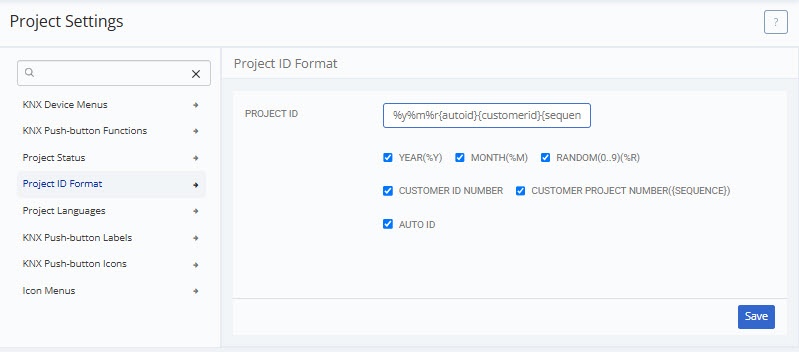
To edit the format, open the side bar and navigate to System > Project settings > Project ID Format.
Project ID Format settings:
Select how you want to format project ID’s by ticking the boxes. You can also freely rearrange the order in which you want the format components to appear by copy & pasting the code within the text field.
The project ID also allows additional text.
Customer ID number, Customer Project number and Auto ID are sequenced numbers.
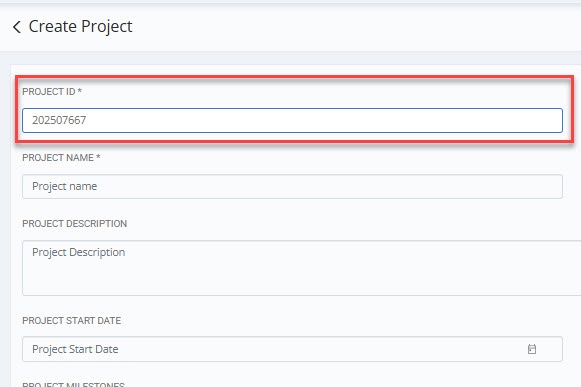
Example of a Project ID (found in project details):
Click the link below to schedule a free live video appointment where we will show you how to setup and customize the KNX TOOL for your current projects.
This website uses cookies to improve your experience. We'll assume you're ok with this, but you can opt-out if you wish. Cookie settingsACCEPT
Privacy & Cookies Policy
Privacy Overview
This website uses cookies to improve your experience while you navigate through the website. Out of these cookies, the cookies that are categorized as necessary are stored on your browser as they are essential for the working of basic functionalities of the website. We also use third-party cookies that help us analyze and understand how you use this website. These cookies will be stored in your browser only with your consent. You also have the option to opt-out of these cookies. But opting out of some of these cookies may have an effect on your browsing experience.
Necessary cookies are absolutely essential for the website to function properly. This category only includes cookies that ensures basic functionalities and security features of the website. These cookies do not store any personal information.
Any cookies that may not be particularly necessary for the website to function and is used specifically to collect user personal data via analytics, ads, other embedded contents are termed as non-necessary cookies. It is mandatory to procure user consent prior to running these cookies on your website.